The job and your AI workbench
See the whole job before you start, learn what an AI agent is, and check what you need.
Your first job
You have probably turned an SME's notes into training before. Think of the last time. What took the most time: finding the facts, fixing the images, or getting answers from the expert? This module works on all three.
You are the new learning specialist at Brimwell Water Systems, a fictional company. On your first day, the Training Manager sends you an email, shown here in short form.
From: Priya Raman, Training Manager, Plant 2 Subject: FX-200 filter change guide for the new maintenance group, due Friday
Six new maintenance technicians start on the 14th. Right now all we have is Tomasz's draft. It is mostly accurate, but it is hard to follow and the pictures are tiny. I need a learner guide (PDF) and a one-page quick reference card by Friday. Do not change any technical values (torque, pressures, part numbers) without Tomasz's OK. If something looks wrong, ask him. Do not guess.
Tomasz is a senior maintenance technician and the SME (subject matter expert)The person who knows the content and must confirm technical facts.ID bridge: The same SME role you already manage in every project.Open in the glossary (SME). He wrote the draft in Word. It has bold text instead of headings, safety steps in a risky order, and information that learners should not see.
Compare the first page of his draft with the first page of the guide you will make. In this lesson you will see the six steps between them, learn what an agentAn AI that can use tools, such as reading files or running commands, and repeat steps until a task is done.ID bridge: Like a production assistant who can open files and use software, not only give advice.Open in the glossary is, and check what you need to start.
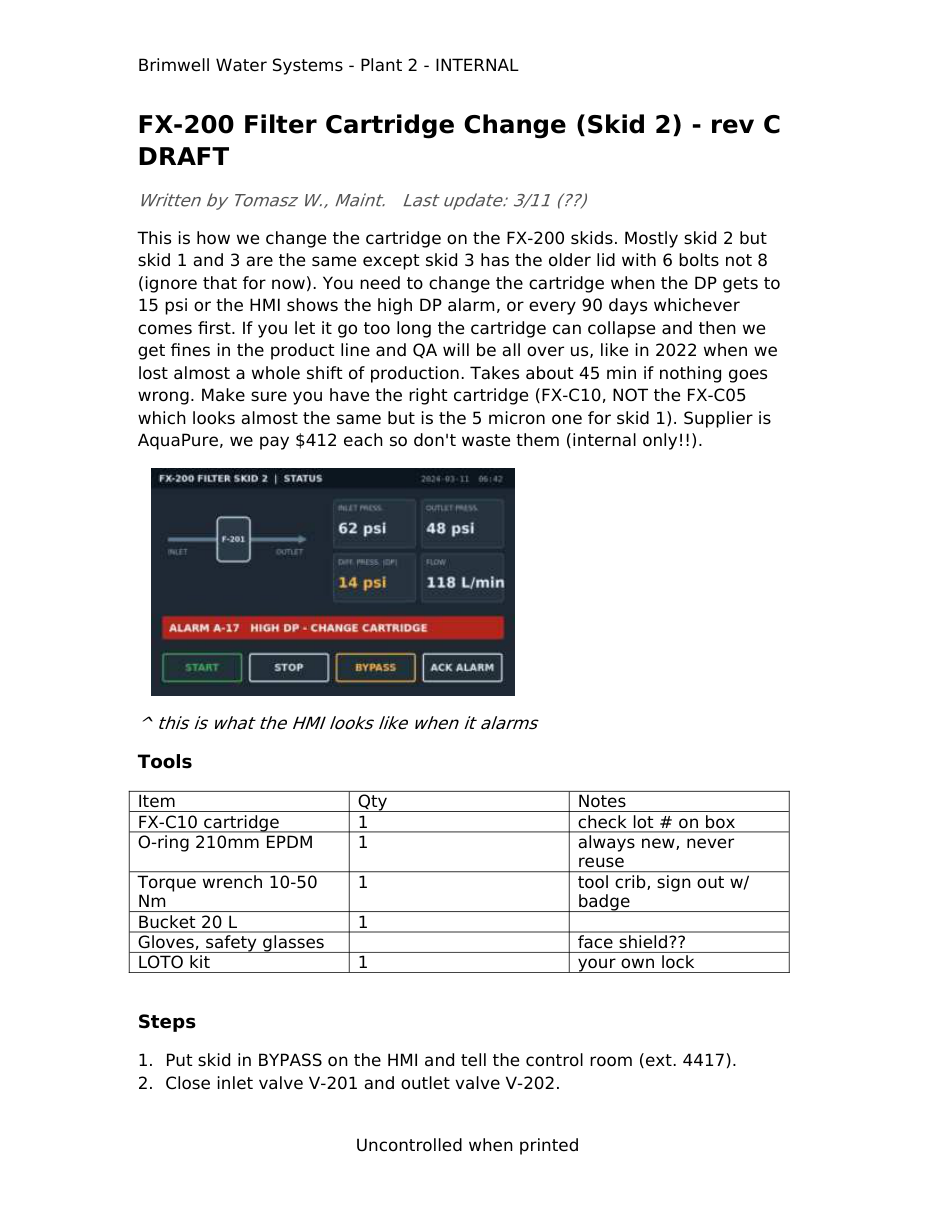
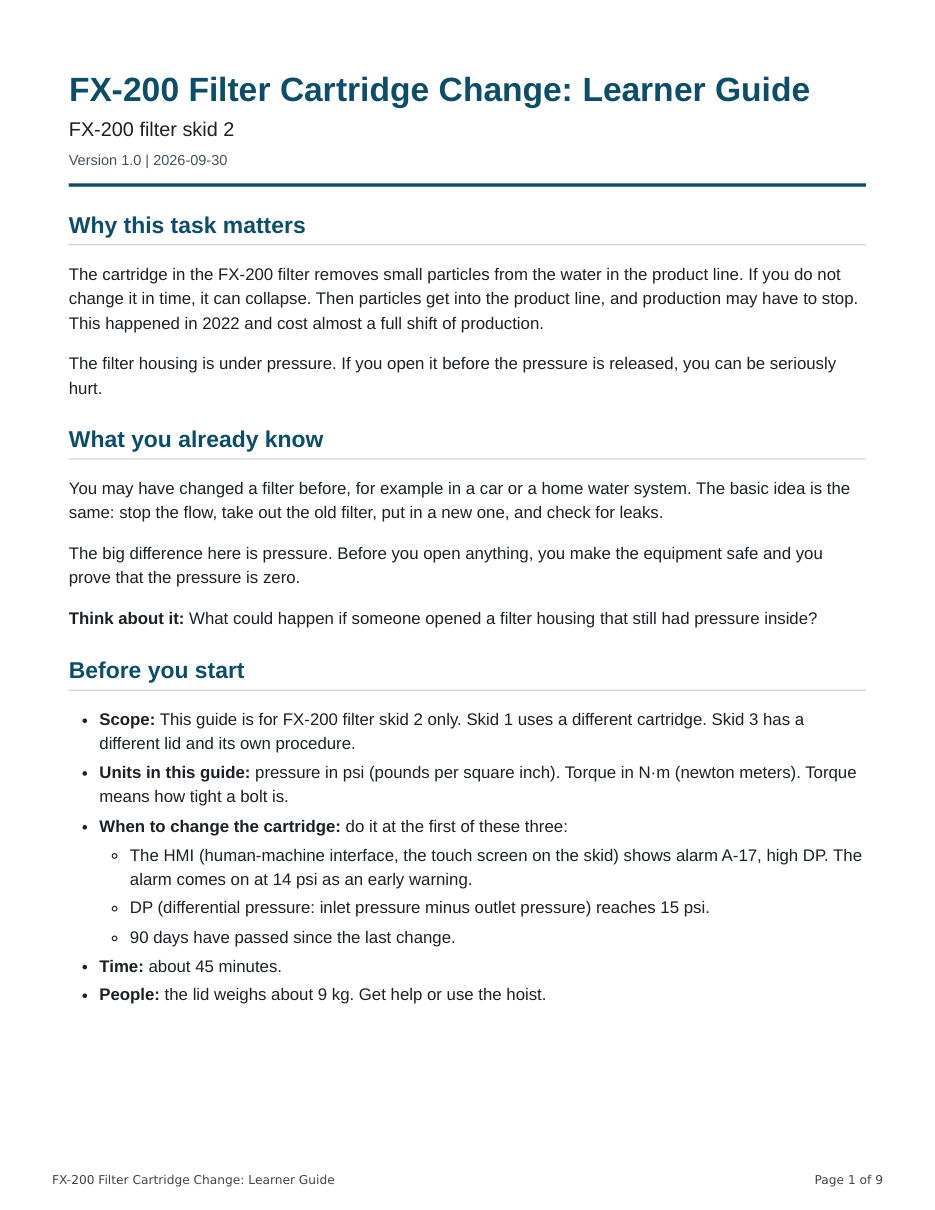
What you will make
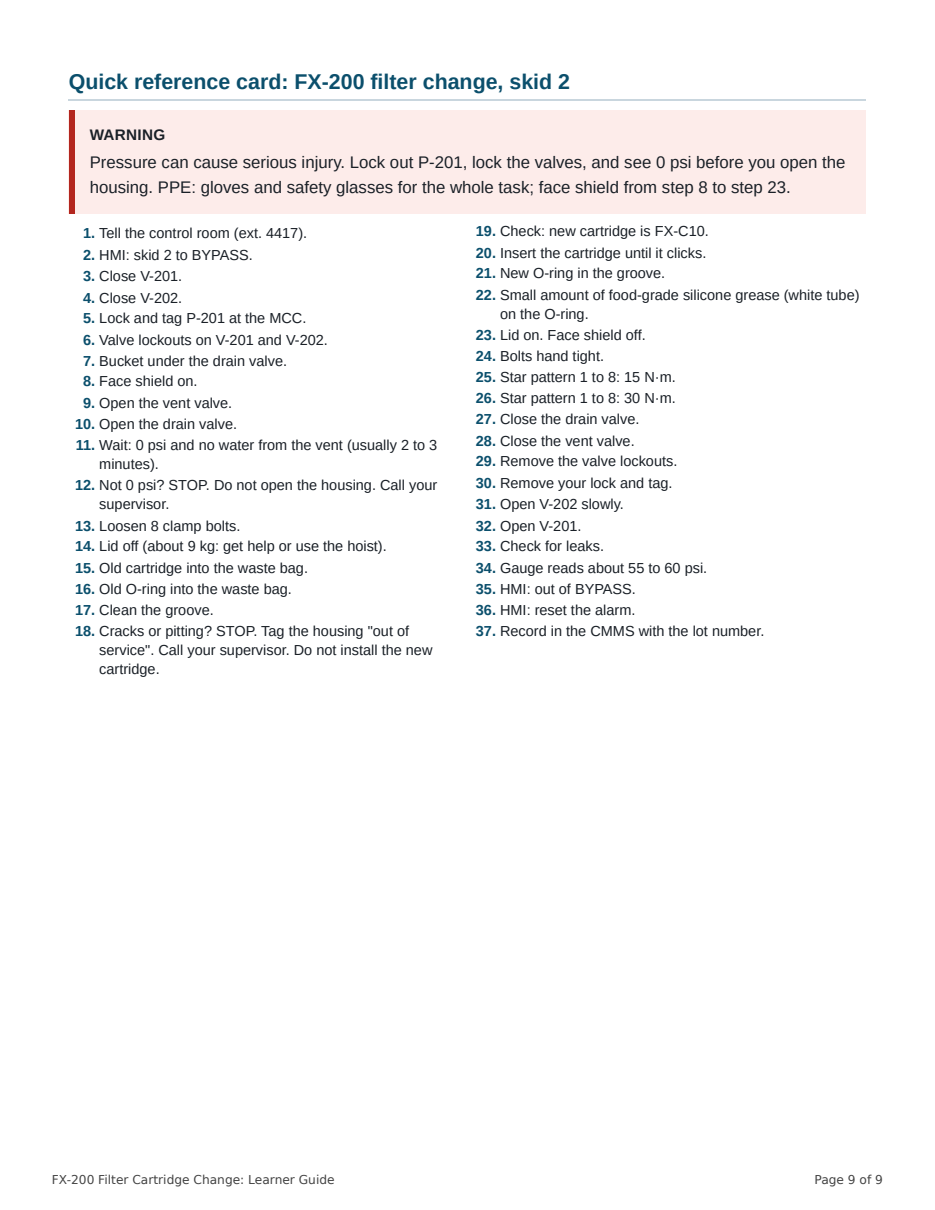
You will make a learner guide as a tagged PDFA PDF with hidden structure (headings, lists, tables, alt text, reading order) that screen readers use.ID bridge: Like the table of contents and headings a screen reader user navigates by.Open in the glossary. This is a PDF with hidden structure, such as headings and image descriptions, that a screen reader can use. A screen reader is a program that reads a page aloud. The guide ends with a one-page quick reference card that technicians can print.
Watch: welcome to the course
Dean Ahlgren, your instructor, explains why this course exists and how much theory you need. The video is still in production, so read its script below. When the video is ready, it will have captions and this transcript.
Welcome to Module 1. The video is in production. Here is the full script.
Transcript: Welcome to Module 1
Speaker: Dean Ahlgren, instructor. Length: about 2.5 minutes. (Video in production. This transcript is the approved script.)
Hi, I'm Dean Ahlgren. I'm an instructional designer.
I got into AI work in a way I did not expect. I created rubrics at the Academy of Art University. The skills I built there turned out to be useful in AI model training and rubric work.
My first AI job interviews were hard. Most of the words were new to me, and I had to study to learn them. Once I did, the work was interesting and varied. Today I work at an AI-powered company.
Along the way, I took two executive AI programs. They covered everything from machine learning to data science to generative AI. Honestly, it was more theory than an instructional designer needs.
I never found an AI course built for people like us: the people who actually build training. Most AI training is for executives or engineers, and most of it is theory. Very little of what I found shows you how to finish real work with AI.
So this course is different. You will learn by doing a real job. In Module 1, you get a messy Word document from a subject matter expert, with tiny images, and a deadline. You will use Claude Code to get the text and images out of it, fix the images, rewrite it with your own instructional design method, review it with a rubric, and publish an accessible PDF.
Along the way, you will see where AI helps, and where it invents things. You will see an AI tool change a torque value in a safety diagram. And you will learn how to catch that.
The fastest way I know to learn AI is to use it every day on real work, and to notice what you don't know yet. That is what we will do together.
Let's start with the job.
Two ideas to learn first
Each new idea comes with a concept card called a depth dial. It has three levels. Use it is what everyone needs to work safely and well. Explain it helps when you talk with managers, SMEs, or IT teams. Build a career on it gives the words that AI teams use. Read as deep as you need.
How AI text tools work
A large language model (LLM)An AI system trained on huge amounts of text that writes by predicting likely next words.ID bridge: Like a very well-read writer who has never checked a source. Great first drafts; needs an SME review.Open in the glossary (LLM) is an AI modelThe trained program that does the AI work, for example Claude Opus or Claude Sonnet.ID bridge: Like choosing between a senior and a junior writer for a task.Open in the glossary that learned patterns from a very large amount of text. It predicts likely next words, so it can write, summarize, and answer questions. It can also sound sure and still be wrong. A clear, confident answer is not evidence that the answer is correct.
Depth diallarge language model (LLM)
Use it. It can write and edit text very well, but it can sound sure and still be wrong. Check facts that matter.
Explain it
The model learns patterns from text during training, then is tuned to follow instructions. It does not look facts up unless a tool gives it sources.
Build a career on it
Pretraining on large text collections, then supervised fine-tuning and reinforcement learning from human feedback shape the model's behavior.
ID bridge: Like a very well-read writer who has never checked a source. Great first drafts; needs an SME review.
AI that answers and AI that acts
A chatbotAn AI you talk with in a chat window that answers but usually cannot work on your files directly.ID bridge: Like asking a colleague for advice versus asking them to do the task.Open in the glossary replies with text in a conversation. An agentAn AI that can use tools, such as reading files or running commands, and repeat steps until a task is done.ID bridge: Like a production assistant who can open files and use software, not only give advice.Open in the glossary can also use tools. It can:
- read and create files in a folder you choose,
- run commands on your computer after you approve them, and
- repeat steps until a task is done.
Claude is an AI model made by Anthropic. Claude CodeAnthropic's agent that works in a folder on your computer, available in the Code tab of the Claude desktop app and in a terminal.ID bridge: A production workbench that follows your standards.Open in the glossary is an agent that uses Claude. You will use it in this course.
This ability brings a risk: an agent can change files you did not mean to change. So you must review and approve what it does. In Lesson 1.2 you will choose a permission modeThe setting that decides whether Claude asks you before it edits files or runs commands.ID bridge: Like approval levels in a review workflow.Open in the glossary, which is a setting that decides when Claude must ask you first.
Last verified: 30 Sep 2026
The Claude desktop app has three tabs. Chat has no file access. Cowork is an autonomous agent for longer tasks. Code runs Claude Code with direct access to your local files. This course uses the Code tab.
Source: Claude Code docs: Desktop
Depth dialagent
Use it. An agent can change files on your computer, so you choose the folder and approve its actions.
Explain it
Agents work in a loop: plan, act with a tool, look at the result, and continue. Permission settings limit what they can do alone.
Build a career on it
Agent design covers tool use, orchestration of subagents, and evaluating whole task paths, not just single answers.
ID bridge: Like a production assistant who can open files and use software, not only give advice.
The workflow in six steps

Each step leaves files that you can open and check.
- Extract. A tool pulls the text, comments, and images out of the Word file. You check the counts. You make
work/01-extract/. - Upscale and compare. Two methods make small images larger. The AI method can change what an image says. You compare each image with the original and decide. You make
work/02-images/image-review.md. - Rewrite. A saved set of instructions (a skill) applies an instructional design method. It makes source facts, SME questions, a draft, and a change log. You make
work/03-draft/. - Review. You score the draft with a scoring guide (a rubric) first. Then Claude scores it. You compare both reviews. You make
work/04-review/. - Revise. You apply the SME's answers. You add a note that says how AI was used, and a record of who reviewed the guide. You make
work/05-final/learning-guide.md. - Publish. You build a tagged PDF, check it, and get sign-off. You make
work/05-final/learning-guide.pdf.
Claude does the fast work. You check the result of every step, and you make the key decisions at steps 2, 4, 5, and 6.
Preview the whole job
The simulation below takes about 5 minutes. It is a simplified copy of the app, so nothing you click changes a real file. It uses some words that later lessons explain, such as permission modes. Make your best guess. The feedback explains each choice.
Simulation
Preview the whole job in Claude Code
A simplified simulation. The real app may look different.
Files
- No folder open
- AppYou are in the Chat tab.
Screen 1 of 11
Open the Code tab
The Claude desktop app has three tabs. Claude Code is in one of them.
Which tab runs Claude Code?
Choose the best answer to go on.
What you need
Your AI workbench is the set of tools and settings that you use for this job. Plans, prices, and system rules change, so each fact below has a check date and a source.
Module 1 takes about 14 hours: five study sessions, plus about 60 minutes for the project self-check. The lesson times are estimates for a careful learner who is new to these tools. Some people need less time, and some need more. That is normal.
Last verified: 30 Sep 2026
Claude Code needs a paid plan. Pro costs $20 per month, or $17 per month billed annually. Max, Team, and Enterprise plans also include Claude Code. The Free plan does not. All plans have usage limits that reset on a rolling five-hour window. Claude Code uses the same limit as chat.
Source: Claude pricing
We have not measured how much of your plan's usage limit Module 1 uses. If you reach the limit, wait until it resets, then continue.
Last verified: 30 Sep 2026
- Mac: macOS 13 or later.
- Windows: Windows 10, version 1809 or later.
- Memory: at least 4 GB of RAM. We suggest 8 GB.
- An internet connection.
Source: Claude Code docs: Setup
To check your system: on a Mac, open the Apple menu and choose About This Mac. On Windows, open Settings, then System, then About. These are operating system screens, so your menus may differ a little.
You also need four items. You set them up in Lesson 1.2.
- The Claude desktop app.
- The Module 1 practice kit, a ZIP folder of fictional Brimwell files.
- A free helper tool named uvA free tool that installs Python and the right packages to run the kit's helper tools.ID bridge: Like a runtime player that makes a course package work on any computer.Open in the glossary.
- Google Chrome or Microsoft Edge. The PDF tool in Lesson 1.7 uses one of them. Safari and Firefox do not work with it.
If your employer manages your computer, ask IT now, because approval can take days. The IT request template has text you can send.
No paid plan yet, or a locked laptop?
The standard path is Claude Code in the desktop app, in a local session. You still have a path in the cases below. Find the row that fits.
| Your situation | What to do | Tested? |
|---|---|---|
| You cannot install uv (locked laptop) | Follow the no-install path in the kit's guide guides/no-install-path.md: copy the finished outputs from answer-key/exemplar/ for each tool step, and do the review, skill, and writing steps in Claude Code. Send IT the IT request template. You can learn every step, but you finish the module project only after you can run the tools. |
The copied outputs are real outputs of the tools. |
| IT will not approve the Claude desktop app | Use "watch and practice" (see "No paid plan yet"), or work on a personal computer with the fictional practice files. | Yes, on this site |
| IT turned off local sessions | Ask IT to allow them. You can also try Cowork in the desktop app. Cowork uses the skills on your Claude account, so upload the two skills there first (Customize, then Skills). | No. Marked untested. |
| No paid plan yet | Choose "watch and practice": the simulation, the ready-made outputs, image review, and rubric scoring. You do not need Claude Code. | Yes, on this site |
Last verified: 30 Sep 2026
On a managed computer, an admin can turn off local sessions. Then Local appears grayed out. Cowork is another mode in the desktop app. It needs no terminal, and it needs a paid plan.
Source: Claude Code docs: Desktop
Note: What was tested and what was not
The examples in this module come from a test run of the whole job in Claude Code. The run used a Linux cloud session, not the desktop app. It tested the helper tools, the main promptThe instruction or question you type to an AI.ID bridge: Like a work request or creative brief.Open in the glossary, both skills, the AI upscaler, and the PDF checks. It did not test the app screens, the Mac and Windows installs, or a real screen reader. Your screen may differ, and Claude's wording changes from run to run.
Your turn
- Complete the simulation. It takes about 5 minutes.
- Tick each item in the requirements checklist. If you cannot tick one, use the table above to find your path.
You made: a picture of the whole job and a checked list of what you need.
Knowledge check
Check your understanding
3 questions. You pass with 3 of 3 correct. Try as many times as you like. Your best result is saved in this browser.